
Code Annotations
Add opt-in line highlighting, line numbers, and annotations to fenced code.
- Plugin ID:
me.kumbuka.code-annotations - Source version:
1.0.0 - Permissions: None
Source · Releases · Installation
Code Annotations adds optional source-line highlighting and notes to Markdown code fences without changing ordinary code blocks.
Usage
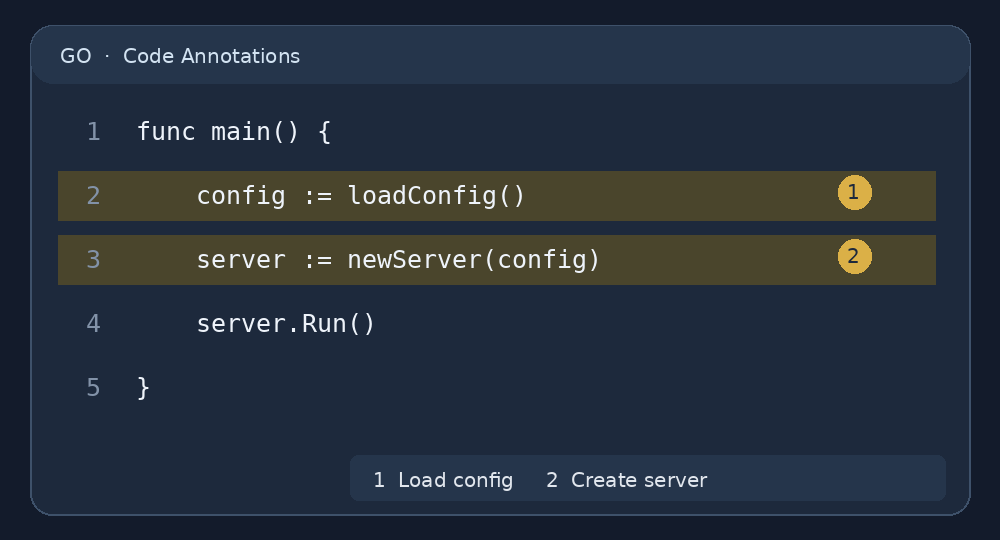
Place a {code ...} directive immediately below a closed, explicitly named code fence:
```go
func main() {
    config := loadConfig()
    server := newServer(config)
    server.Run()
}
```
{code highlight="2-3" note="2:Load configuration." note="3:Create the server." reference-position="left" reference-color="yellow" line-numbers="true"}
The directive applies only to the preceding fenced block. Ordinary fences, including those containing a literal {code ...} line, continue through Kumbuka’s normal Markdown and Syntax Highlighting pipeline. Disable this plugin to stop processing code annotations; the standard fence remains readable Markdown.
Options
highlight="2,4-6": Shade selected one-based lines and inclusive ranges without requiring annotations.note="2:Explain this line.": Add one numbered note to a line; usenote="2-4:Explain the section."for a range. Repeatnotefor additional notes.reference-position="left": Place note markers on the left or right (default:right).reference-color="yellow": Selectaccent(default),blue,green,yellow,orange,red,purple, orgray.highlight-references="false": Disable background shading from notes while retaining explicithighlightranges.line-numbers="false": Hide the source-line number gutter (shown by default).
Only a single language identifier is supported in the fence opening line. Options require quoted values. The directive must immediately follow the closing fence, on its own line. Annotations and highlight ranges must refer to lines inside the block. Limits: 128 KiB of code, 10,000 lines, 32 notes of up to 2,048 bytes each, and 64 highlight ranges.
Editing
Use Insert → Annotated code in the editor toolbar to insert a visual-editor-friendly annotated-code macro. In Visual mode, select the card to edit its source text, language, highlight ranges, and numbered notes. Click the rendered line numbers or select a range to add annotations directly.
Visual-mode blocks serialize as a macro containing a quoted, escaped code source, for example:
{{annotated-code language="go" source="func main() {\n}" highlight="1" note="1:Program entry point."}}
Both forms produce the same code presentation. Ordinary fenced blocks followed by {code ...} are convenient for hand-written Markdown but cannot yet be edited as a single widget in Visual mode; Kumbuka’s current widget schema does not recognize postfix directives attached to normal fences. The macro form provides full visual editing without modifying core or taking over normal code fences.
Security
Code and notes are escaped, not interpreted as HTML. The plugin needs no permissions and makes no network or database requests. It uses the same internal code-presentation library as External Files, but does not fetch external source files.