
Administration
Editor toolbar
Open Administration → Editor toolbar to customize plugin contributions globally. Each row shows the contribution and plugin, its current semantic group, visibility, and numeric order. Only groups allowed by the plugin are offered. Numeric ordering controls provide an accessible alternative to drag and drop, and Reset restores the plugin’s manifest defaults.
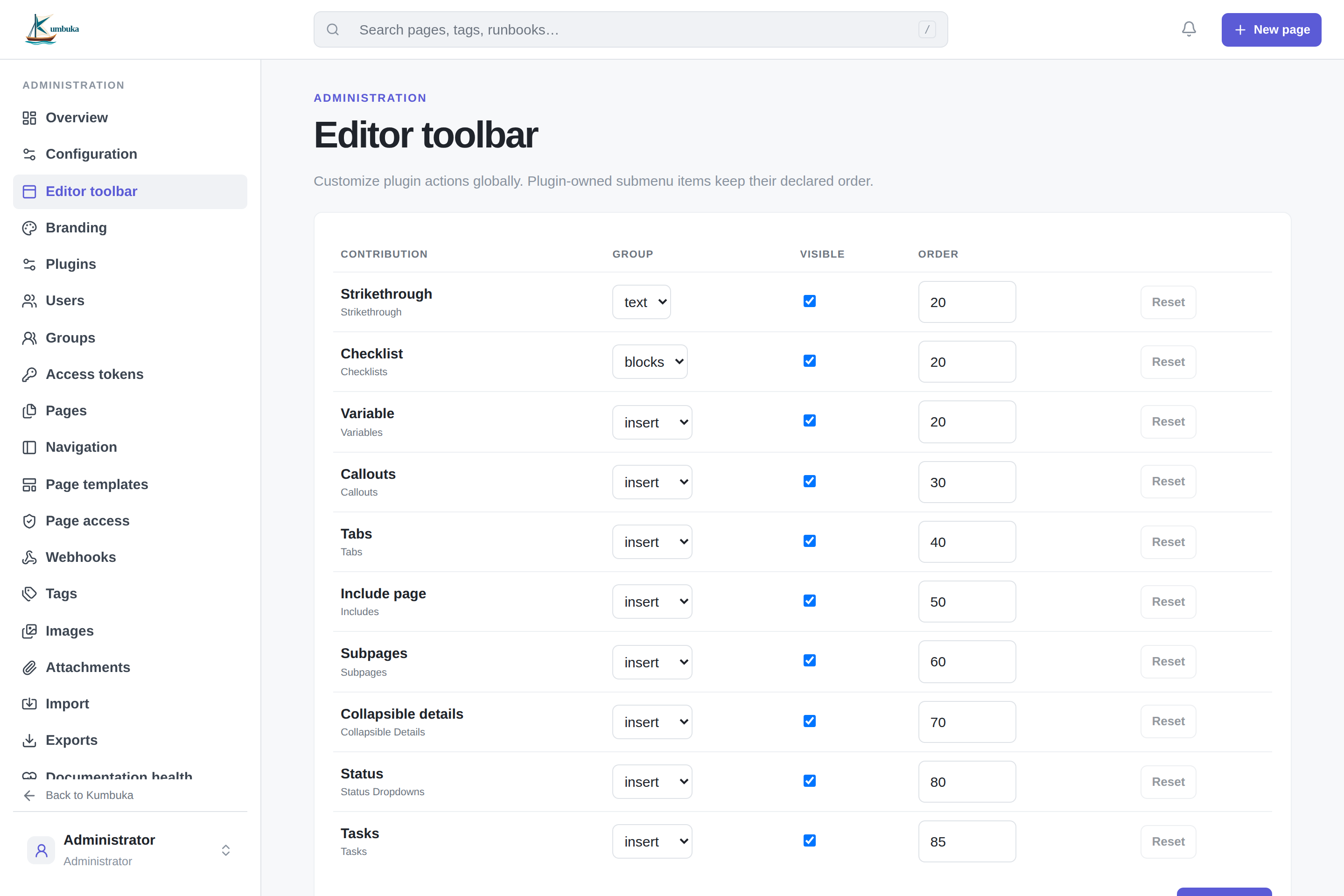
Overrides use stable plugin and contribution IDs, so they survive plugin upgrades. Disabled, removed, or renamed contributions are ignored without breaking the editor; an override is retained so it can apply again if the same stable contribution returns.
The administration area is available only to admin users. It covers application configuration, branding, plugins, users, groups, page inventory, navigation icons, reusable content, tags, tokens, imports/exports, media cleanup, documentation health, audit history, and the recycle bin.
User profiles and external identities
Under Administration → Users, local-account usernames, email addresses, and display names are directly editable. OIDC profile fields show whether they are provider-managed or locally overridden, and each override can be restored independently. Trusted-proxy email and display name work the same way, while the trusted username is changed only through the explicit Relink identity action because it is the external account key. Profile overrides, restores, and trusted-proxy relinks are recorded in the audit log.