
Tasks
Add persistent nested task trees with descriptions, assignees, due dates, configurable states, and notifications to Kumbuka pages.
- Plugin ID:
me.kumbuka.tasks - Source version:
1.10.0 - Permissions:
browser:render,settings:read,storage:read,storage:write,pages:content,users:read,notifications:send
Source · Releases · Installation
Create persistent nested task trees with configurable workflows. Administrators can define a default workflow and reusable workflow groups in Plugin settings → Tasks.
Reference a reusable group from a task tree:
{{tasks workflow="release-flow" texts="Prepare release"}}
Tasks adds persistent actionable task trees to Kumbuka pages. Tasks can have descriptions, assignees, due dates, configurable workflow states, and arbitrarily nested subtasks up to the configured safety limit. State changes are stored separately from page Markdown, so checking a task does not create a page revision.
Visual editor
The preferred way to create and edit tasks is the Tasks block in the Visual editor. One block owns the entire task tree and opens one large task editor.
The editor deliberately hides implementation details. Users never enter task IDs or parent IDs. Kumbuka creates stable internal task identities automatically and preserves them when a task is renamed, reordered, or moved. Parent relationships are derived from the visible tree.
For every task you can edit:
- Task — the short task title.
- Description — optional longer context, instructions, or acceptance criteria.
- Assignee — an optional canonical Kumbuka mention such as
@alice. - Due — an optional calendar date.
- Initial state — an optional workflow state ID. When omitted, the first configured state is used.
Use + Add task for another top-level task and + Add subtask on any task to create a child. Subtasks can themselves contain subtasks. Tasks can be dragged to reorder them or moved into another task’s subtask area. Deleting a task with descendants asks for confirmation before removing the whole subtree.
The editor supports nesting up to 16 levels. Completing every child does not automatically complete its parent; each task has its own persisted state.
A newly inserted block intentionally contains no public ID:
{{tasks texts="Describe the task"}}
When the block is first applied in the Visual editor, Kumbuka writes generated internal IDs into the source. They remain hidden from the normal editor UI and should be treated as persistence metadata.
Source mode
The readable single-task syntax remains supported for users editing Markdown directly:
{{task id="release" text="Prepare release" description="Test and publish the release." assignee="@alice" due="2026-10-01"}}
{{task id="release-notes" parent="release" text="Publish release notes" description="Include migration notes."}}
{{task id="production" parent="release" text="Deploy to production" assignee="@bob"}}
{{task id="verify" parent="production" text="Verify production health"}}
Adjacent declarations are rendered as one tree:
Prepare release
├─ Publish release notes
└─ Deploy to production
   └─ Verify production health
For source-mode {{task ...}} declarations, id and text are required. description, assignee, due, initial, and parent are optional. IDs support letters, numbers, ., _, -, /, and :. Keep an ID unchanged because persisted state is keyed by it.
The compact {{tasks ...}} syntax used by the Visual editor stores parallel task fields in one macro. Those list attributes and generated IDs are implementation details; normal users do not need to edit them manually.
Task declarations inside fenced code blocks or inline code remain literal. Invalid declarations render a visible Task error instead of silently disappearing.
Workflow states
Open Administration → Plugin settings → Tasks → Workflow to configure the ordered state list. Each state has:
- a stable lower-case ID, such as
todo,in-progress, ordone; - a user-facing Label;
- a Color used by the interactive state control;
- a Completed flag used for completed-task presentation and completion/reopen notifications.
When no states are configured, Tasks uses the backward-compatible open and done workflow. Existing persisted open/done values and the previous boolean JSON state format are mapped to the closest configured incomplete/completed state.
Interaction
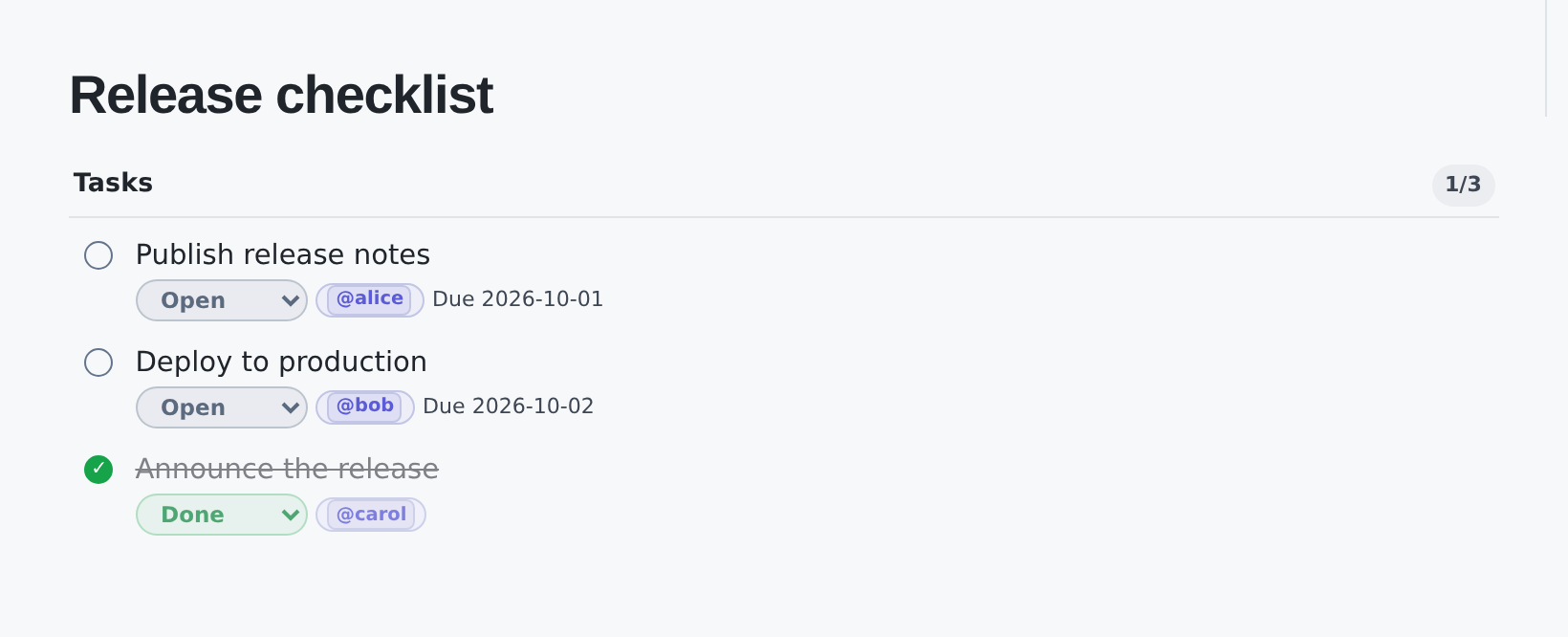
Rendered task trees use compact rows rather than large cards. Nested tasks are shown below their parent with hierarchy lines. The visible state pill is a native select that changes state, while the circle at the left remains a quick state indicator. Descriptions and task metadata remain visually secondary. Completed tasks are muted and struck through, and multi-task lists show a completed/total counter.
State changes are sent through Kumbuka’s host-mediated page-details command handler. Before persisting a change, Tasks rereads the current page and verifies that both the task and requested state are still valid.
The Tasks section in page details shows the current state and provides one non-JavaScript Move to … action per task that advances to the next configured state.
When an assignee is initially set or changed, Tasks creates an attributed Kumbuka in-app notification from the committed old/new page Markdown. When an assigned task changes state, Tasks also notifies the assignee. Crossing into a completed state produces a completion notification; leaving one produces a reopened notification; other transitions produce a state-change notification.
Notification keys are deterministic, so retries do not create duplicate in-app notifications or duplicate notification.created webhook events. Rendering a page never creates notifications.
Permissions
browser:renderrenders the interactive state controls in Kumbuka’s isolated browser-module frame.settings:readreads the administrator-configured task workflow.storage:readreads persisted task state.storage:writepersists validated task changes.pages:contentrereads the current page before accepting a task command.users:readresolves canonical assignee mentions without exposing contact details.notifications:sendcreates core-owned in-app notifications after committed assignment and state mutations.